Back

Transforming ANNA’s PDF approval process

Role
Lead Product Designer
Year
2026

I co-created an AI agent and transformed the experience, increasing document approvals by 84%

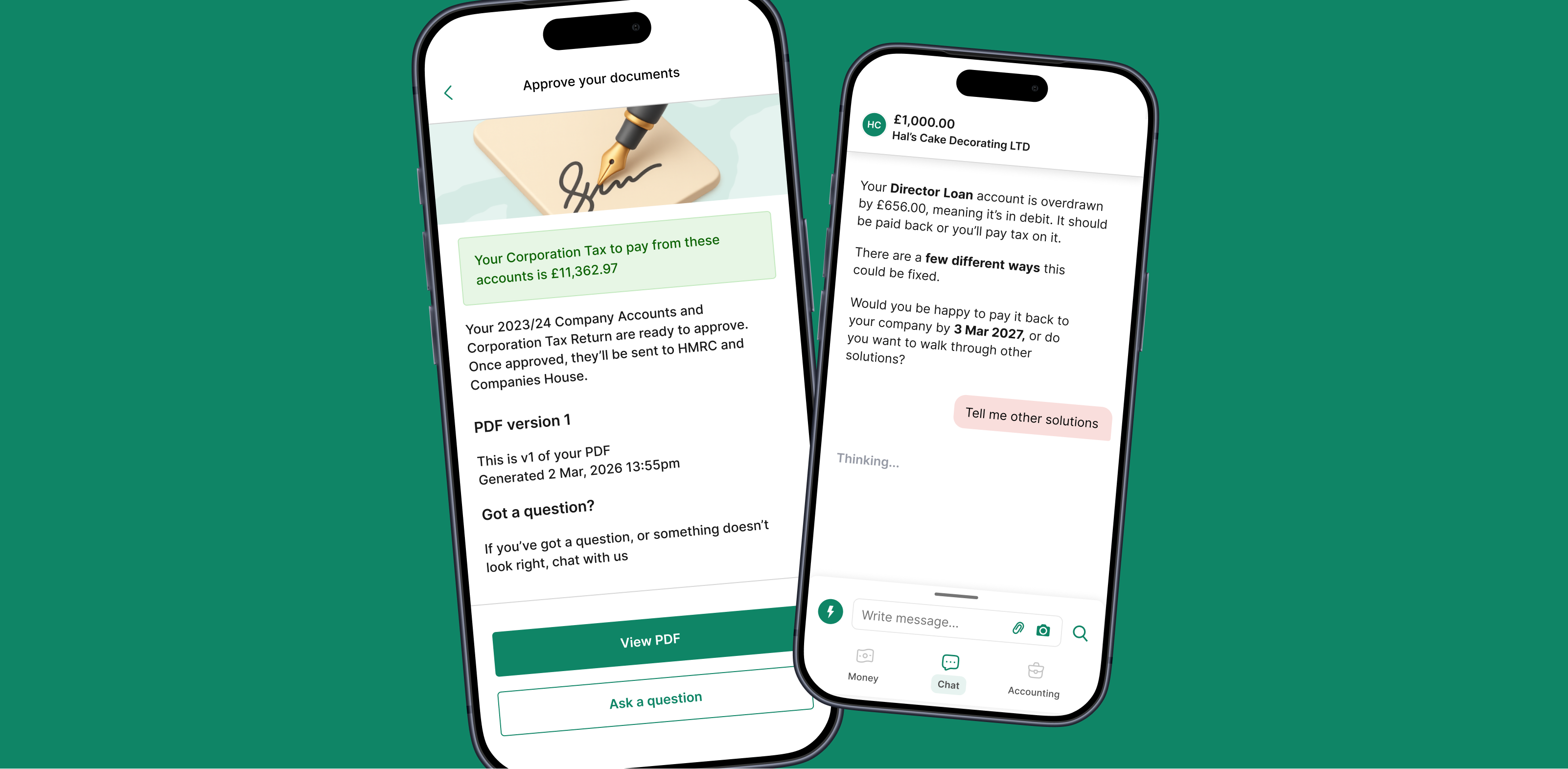
Two ANNA app screens: approving Company Accounts documents, and the AI agent explaining an overdrawn Director Loan

Problem

Only a fraction of customers were approving the one document that kept their subscription alive

Each year, ANNA prepares a business’s Company Accounts and Corporation Tax Return and files them with HMRC and Companies House. Filing is the moment customers see the value of the monthly subscription they’ve been paying for all year.

Documents can’t be filed until the director approves their PDF, but approval rates were low, and customers who didn’t approve were more likely to churn. I led the work to get more customers approving.

The opportunity

How might we significantly increase the number of accounting PDFs being approved?

Team size: 7
Me, 3 engineers, 2 Data Science contributors and our in-house accountant
Timeline
2 months in 2026 alongside other projects
Client
ANNA Money, 100,000+ small business owners in the UK and Australia

What I did

The impact

I led the project end-to-end, from framing the problem and research through to final design production. I brought engineering, Data Science and our in-house accountant together around two bets for lifting approvals, and used a prototype created using AI to drive direction.

I designed a mobile-app approval flow and, with Data Science, co-created a conversational AI agent, turning a stalled, desktop-only task into automated self-service filing.

  • Problem framing
  • Research insights
  • Journey mapping
  • AI prototyping
  • Conversational AI design
  • UI design
  • 84% more approvals

    PDF approvals rose 84% in the 90 days after the AI agent and new PDF approval experience launched

  • 80% task resolution

    By August 2026, users had resolved 80% of July’s accounting tasks with the AI agent, unblocking their PDFs

  • File with AI

    Business owners can now file end-to-end themselves with AI, a key aspect of ANNA’s Auto Accountant product

Process Step 1

I diagnosed underlying issues

I investigated the current experiences to identify underlying issues that were contributing to the low rate of PDF approvals. Here’s what I discovered.

  • Support issues were blocking PDF generation

    Many users couldn’t have PDFs sent to them because they had underlying accounting issues being managed slowly by the support team.

  • Mobile app had no functionality

    The in-app chat message telling users to approve their documents was a dead-end, leading nowhere.

  • Desktop login was causing friction

    To approve documents, users had to log in to the desktop version, which required remembering credentials and wasn’t very mobile friendly.

Process Step 2

I explored a vision with the team

I brought our cross-functional team members together to discuss two bets for increasing PDF approvals: a seamless mobile experience, and building out ANNA’s AI agent capabilities. These directions were exciting, but also threw up many complex aspects that would need to be resolved by design thinking, such as what would happen when a PDF has become out of date because a user has changed their underlying financial data.

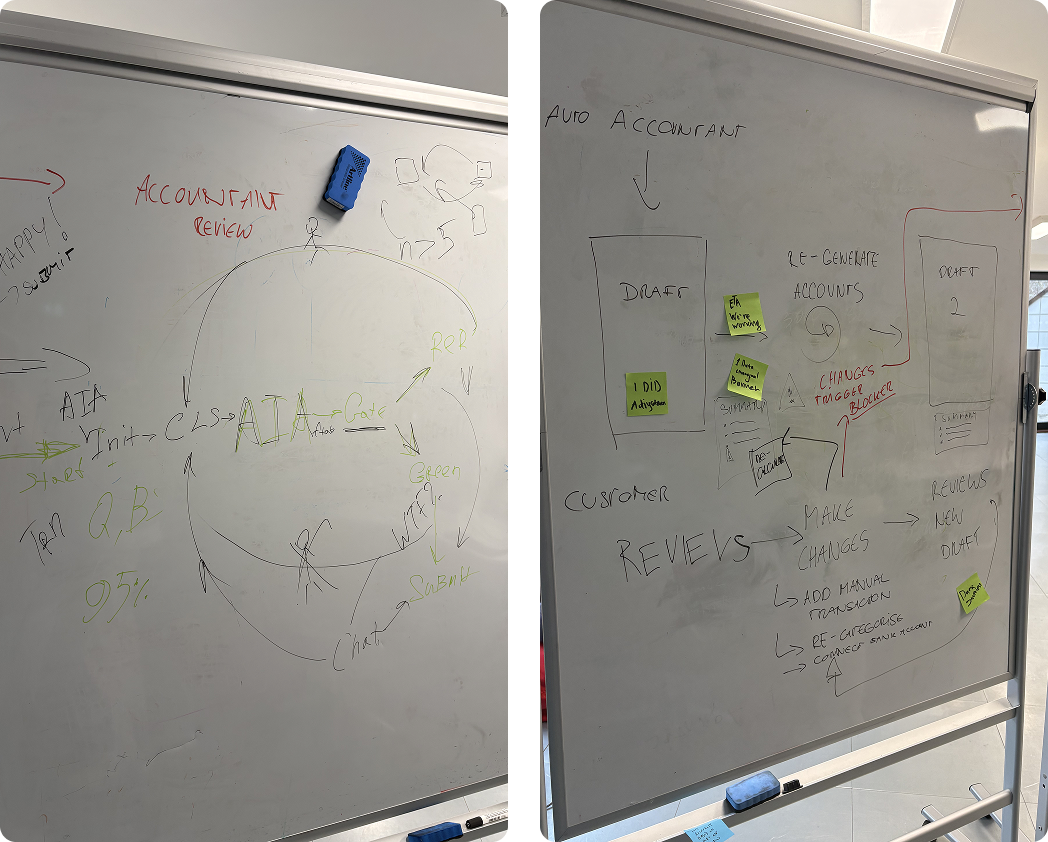
Two whiteboards from the team session, mapping the AI agent and accountant review flow

Two bets

  • AI agent to unblock issues

    Hypothesis: An AI agent that helps users solve accounting issues that are blocking document generation will increase the volume of PDFs to approve.

  • Seamless approval in the app

    Hypothesis: A seamless experience in the mobile app to review and approve accounting documents instead of sending users to web will increase PDF approvals.

Process Step 3

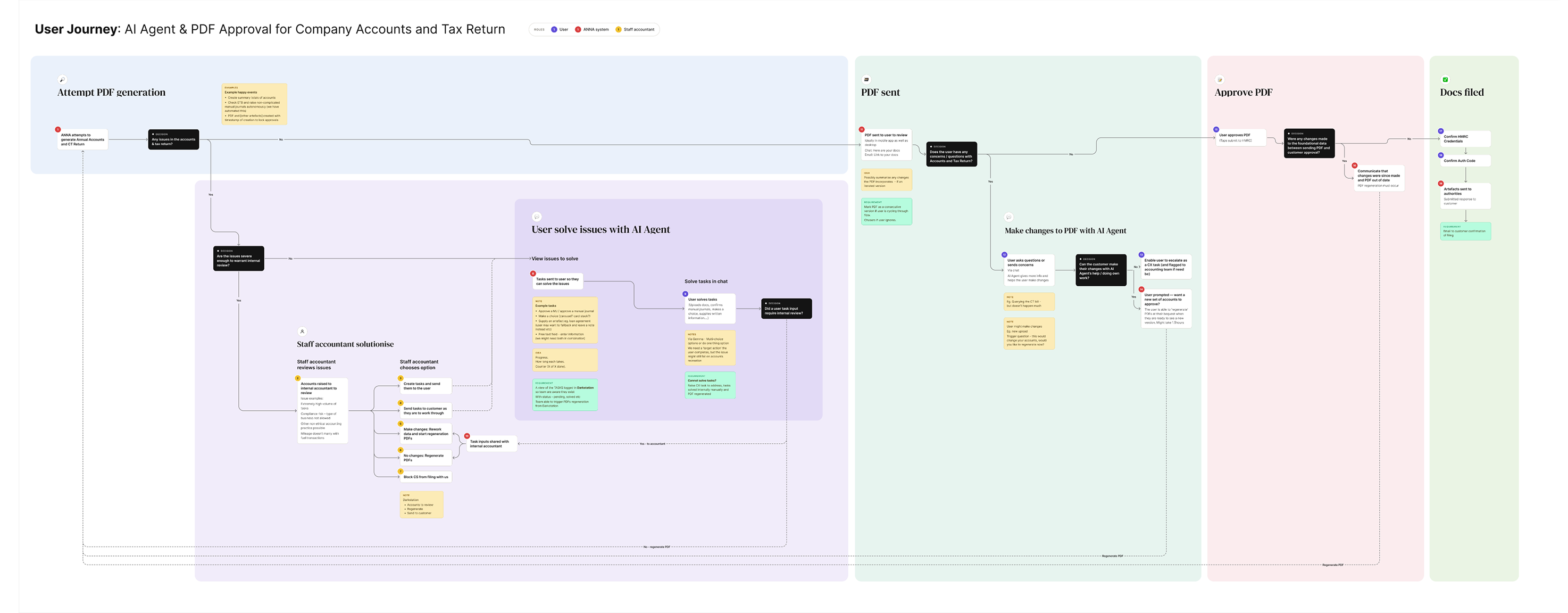
I mapped the user journey

I mapped the team’s ideas into a journey, and shared this with the team (Data Science, engineering, product) to obtain continued alignment and collect any missing aspects.

User journey map for the AI agent and PDF approval, across PDF generation, solving issues with the AI agent, PDF sent, approval and filing

The user experience: A summary

  1. 1 User

    I solve accounting issues

    With the AI agent, in chat

  2. 2 System

    My PDF is generated

    ANNA’s system auto-creates my tax docs

  3. 3 User

    I receive my PDF

    I’m notified the PDF is ready to approve

  4. 4 User

    I approve my PDF

    I review the PDF and approve it for filing (or make changes)

  5. 5 System

    My PDF is filed

    With authorities, automatically

  6. 6 User

    I retrieve my PDF

    From the platform anytime

Process Step 4

I distilled research insights

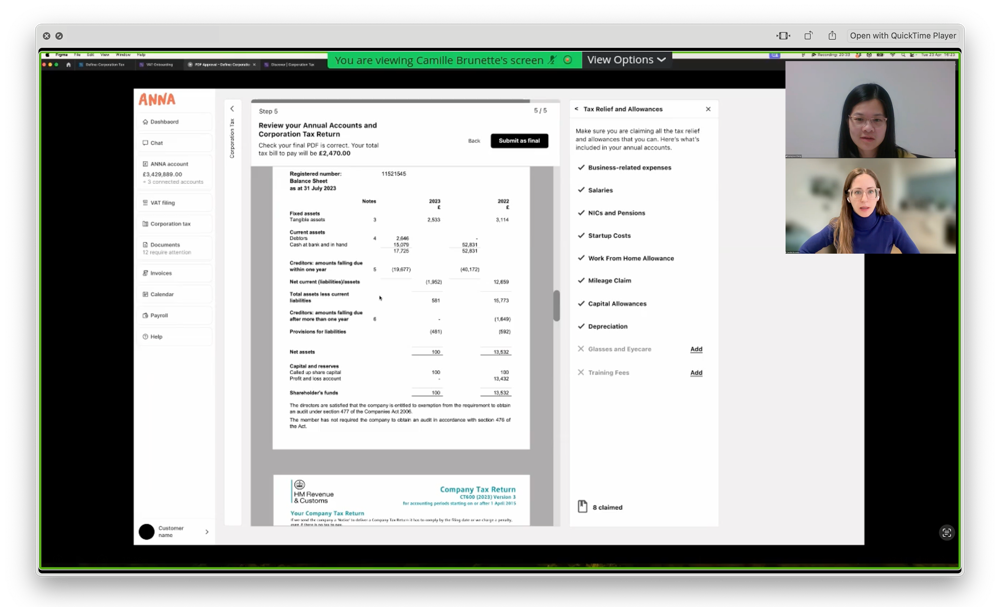
With deadline pressure blocking the ability to conduct tailored research, I revisited interviews from an earlier accounts-approval study I had conducted on desktop, and distilled useful insights covering customers’ perspectives. This helped guide design decisions and drive understanding in the wider team.

A recorded user interview, with a customer reviewing their annual accounts PDF on a shared screen

What users told me

  • ‘I’m willing to try AI’

    75% said, if issues existed, they would try an AI accounting service prior to a human. This reflection of trust gave me confidence that an AI agent was a good solution to proceed with.

  • ‘Let me dive in’

    Users said they were happy to work on their own business financial records if they were guided on what needs to be done.

    This made me think they’d be comfortable doing some work to fix issues, as opposed to the traditional and expensive method of handing everything to an accountant.

  • ‘Make sure I’m compliant’

    Filing correctly for HMRC really mattered.

    This drove my ambition to ensure the agent was accurate enough to fix issues properly, so I worked hands-on with the Data Science team, reviewing AI chat logs and suggesting improvements to the Knowledge Base driving the AI’s answers.

  • ‘Guide me on things I don’t know’

    Users wanted complex accounting terms in plain English.

    I made sure to add help content and include a way for users to ask questions in their own words when they were reviewing their accounts PDFs.

Process Step 5

I created a prototype rapidly using AI

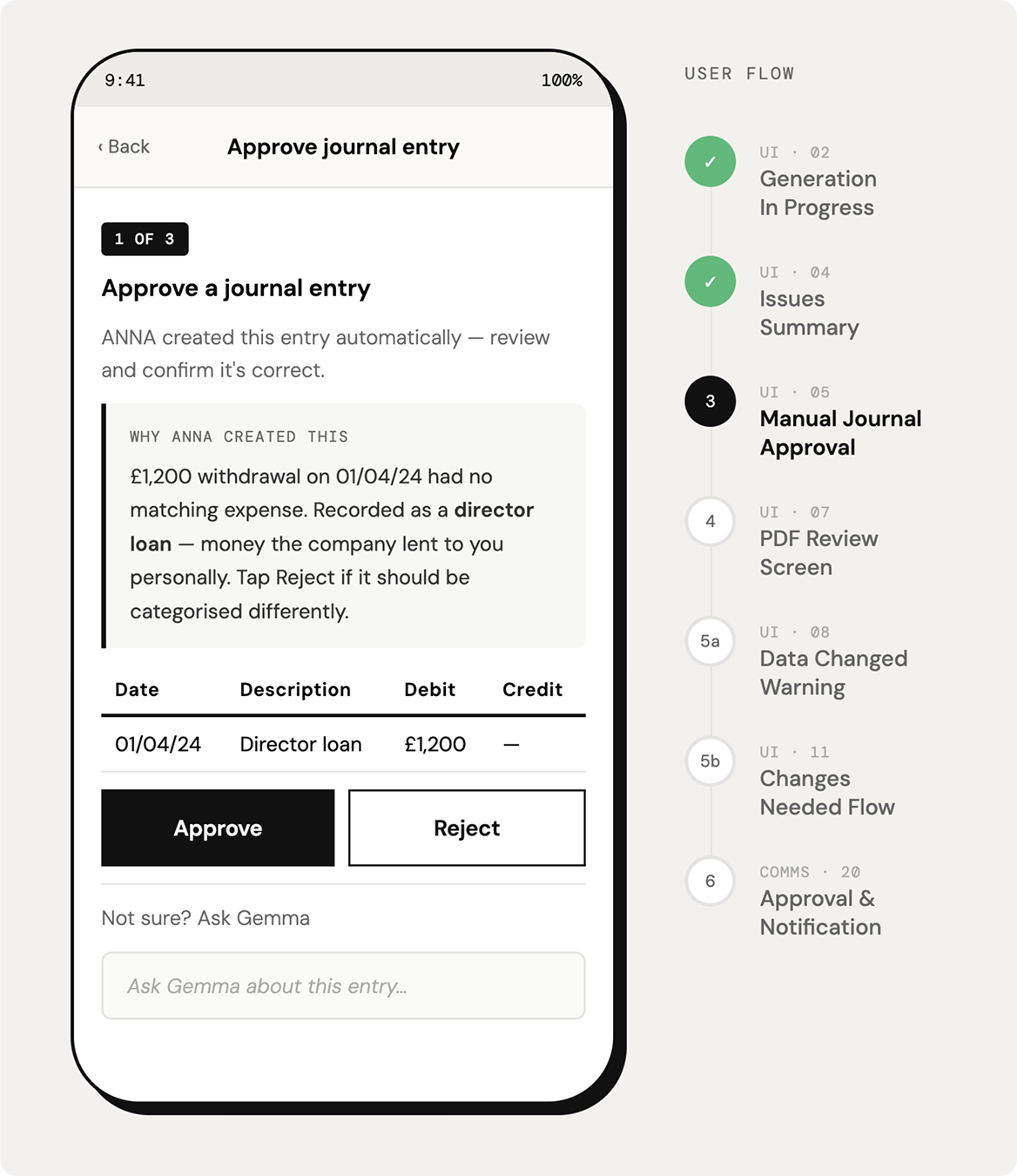
I fed my User Journey Map to Claude and asked it to create a prototype. It wasn’t connected to a design system (as at January 2026) and was visually a rough piece, but it was helpful to move the project forward.

I immediately saw:

  • How content in the prototype could be combined and minimised for simplicity
  • Some good, clear language I would keep
  • UI concepts for resolving accounting issues within the conversation, such as inline tables and radio options. Ideas like this were earmarked for post-MVP

The prototype was also an excellent central point for the team to gather around and crystallise how the AI agent would behave – its scope of knowledge, for example.

The AI-generated prototype: an ‘Approve journal entry’ screen beside a user flow of seven steps

Process Step 6

I created final UI screens using a design system

I created the final UI screens from ANNA’s design system, following patterns used across the wider product so the experience stayed consistent. I wrote the interface copy, then used AI to refine it against the company’s tone of voice guide.

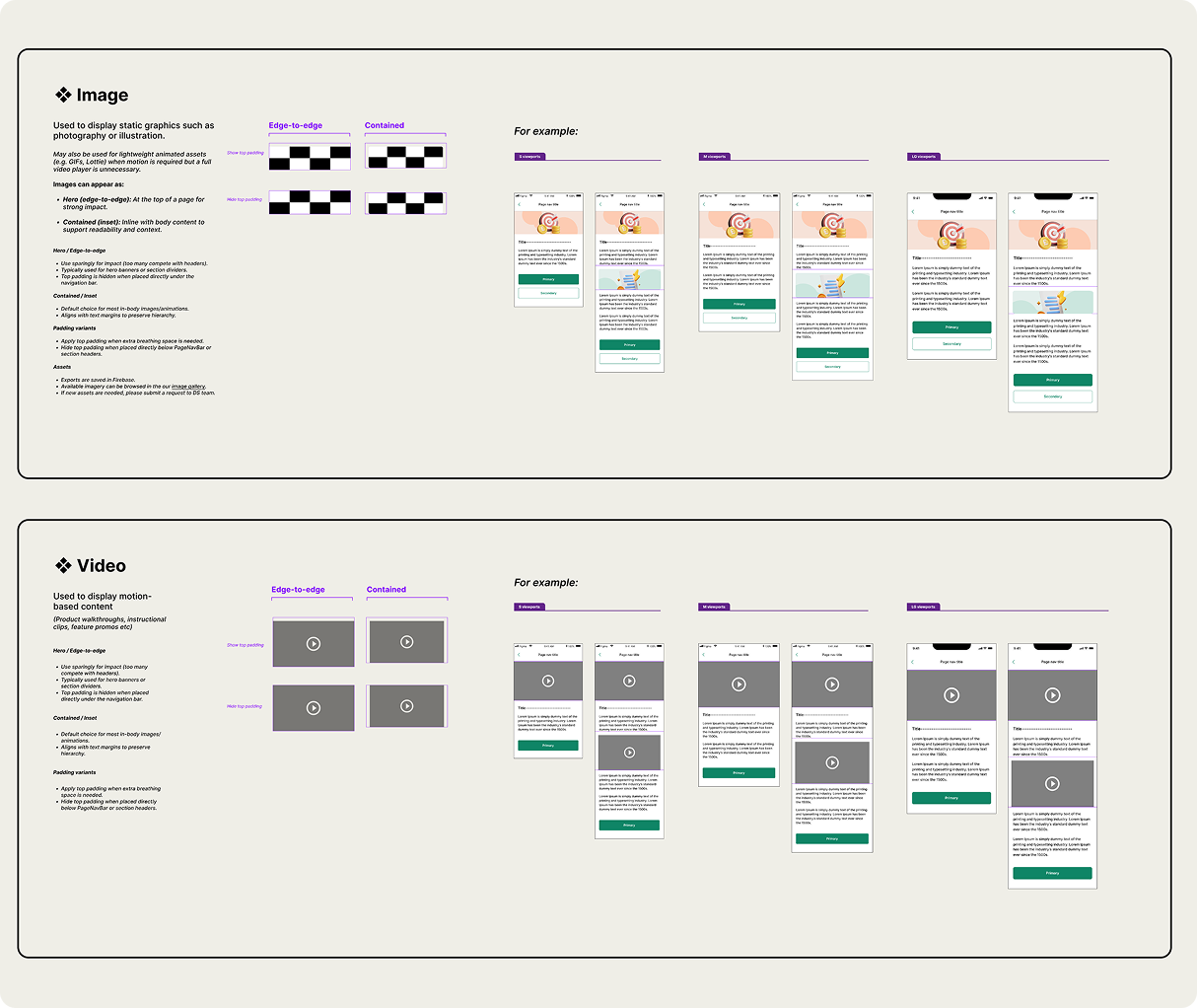
Along the way, I spotted gaps where new UI would make solving tasks through conversation more effective. The design system team was busy with a redesign, so I logged these component requests for v2 and kept v1 on track to ship on time.

Design system documentation for the Image and Video chat components, with example screens

Solutions

See final design solutions shipped for this project

  1. 1
  2. 2
  3. 3
  4. 4
  5. 5
  6. 6

Solve issues

The user solves issues with an AI agent

In chat, the agent informs the user of accounting issues blocking the generation of their PDF and shares a payload card linking to a task list. The list acts as a grounding element, so the user can keep track of what needs doing.

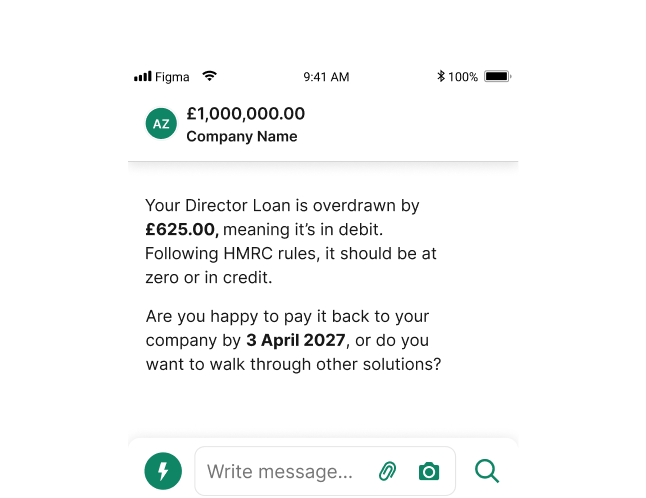
The agent holds a conversation offering different solutions for solving issues (which could be, for example, an overdrawn director loan account or incomplete payroll figures).

The user interacts by agreeing to an option, supplying new information, uploading artefacts, etc. The agent has a goal of closing tasks so a PDF can be generated, each task type being a capability.

Why an AI agent?

An AI agent suited this problem for several reasons. It reduces internal effort, because users can resolve issues themselves instead of relying on ANNA staff. It translates complex accounting issues into plain language, and it changes direction as customers respond, handling a wide range of scenarios. Research also showed that customers were ready for it. They trusted AI enough to try it before asking a human, and they were happy to roll up their sleeves and get involved.
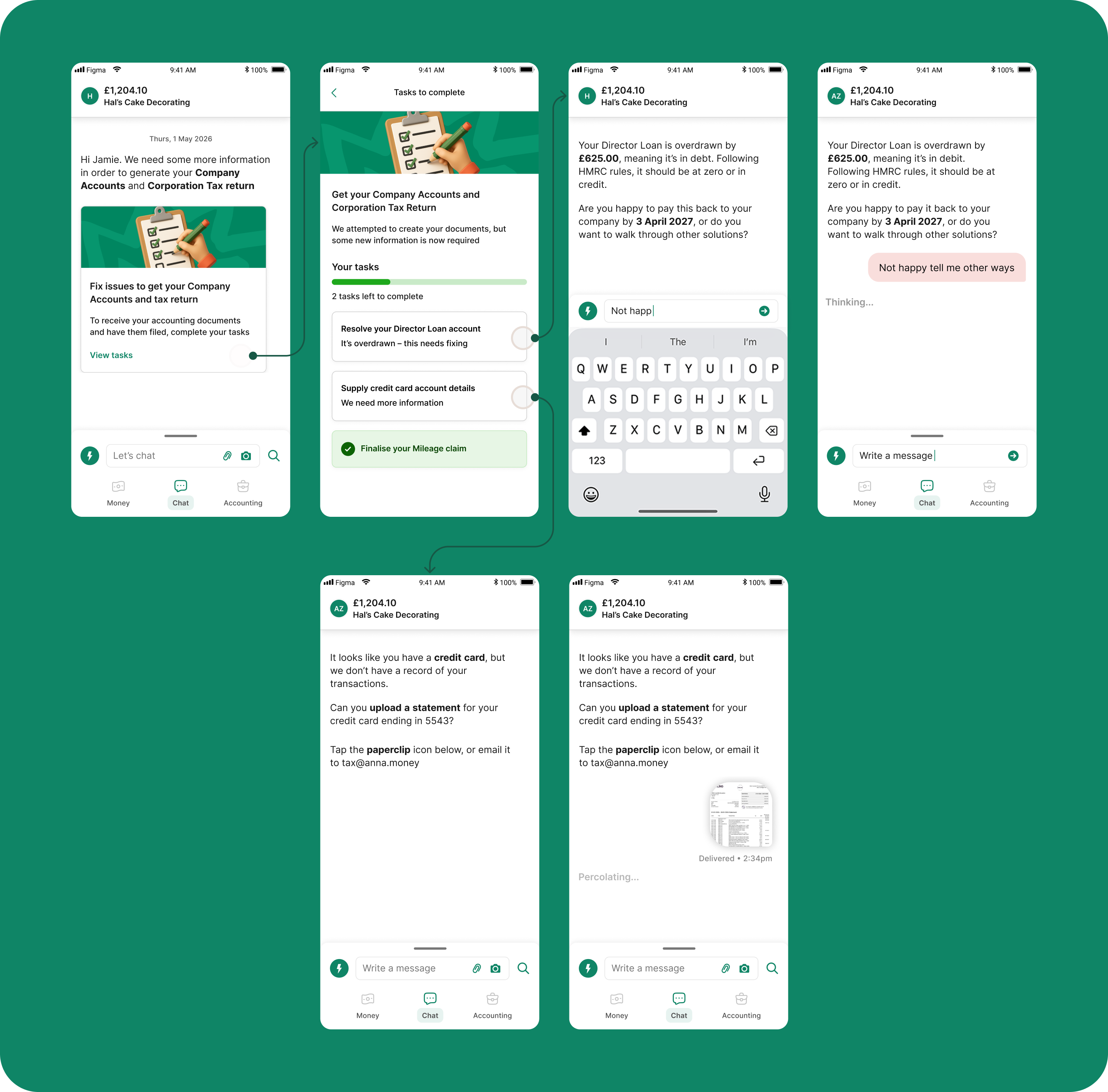
Six chat screens: the agent asks for more information and links to a task list, explains an overdrawn Director Loan, and asks the user to upload a credit card statement

Designing an agent users can trust

Some of the recommendations I shared with Data Science to embed in the experience

  1. 01

    Understand the customer

    Refer to wide customer financial data to provide solutions; there is no one size fits all

  2. 02

    Communicate simply

    Explain user’s required actions in basic, simple ways, with processes itemised in steps

  3. 03

    Lead through tasks

    After user completes one task, immediately help them with the next one

  4. 04

    Be transparent

    Trust comes from honesty. Explain how agent came to solutions if required, whilst operating within compliance rules

  5. 05

    Keep it obvious

    Leverage ANNA’s simple and clear controls (upload file; native select list; add photo, etc)

  1. 1
  2. 2
  3. 3
  4. 4
  5. 5
  6. 6

Generate and receive

The user is clearly aware of their PDF to approve

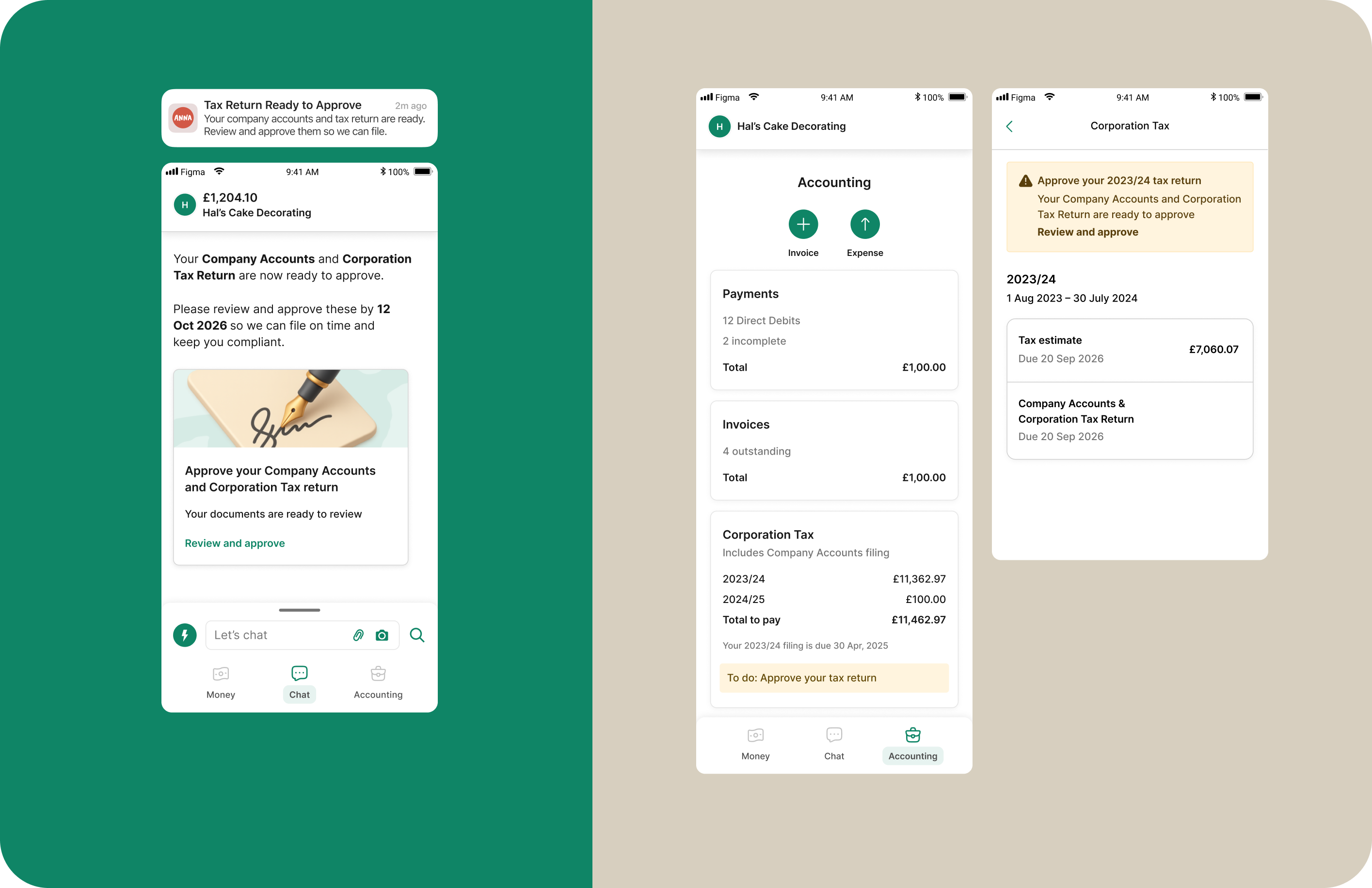
After resolving any accounting issues, the user gets a chat message saying the PDF is ready to approve.

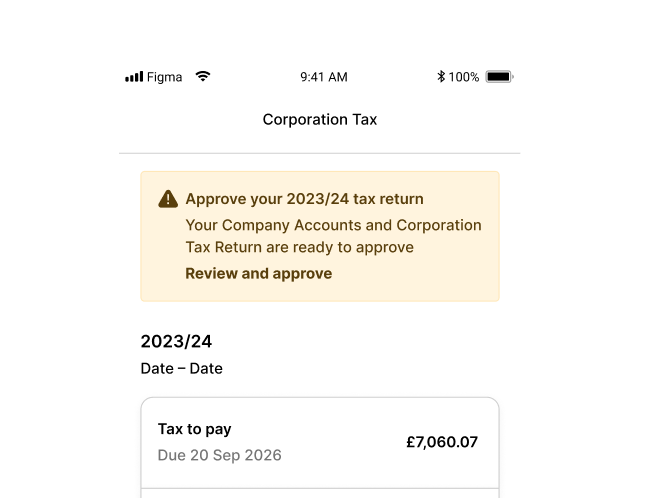
I observed only 42.2% of users were seeing the original chat message that notified them their PDF was ready. To help increase awareness, I added page banners to key app screens to flag a PDF was ready to approve. This took low effort to implement yet scaled up visual impact considerably.

A push notification and chat message saying the documents are ready to approve, beside Accounting and Corporation Tax screens with ‘approve your tax return’ banners
  1. 1
  2. 2
  3. 3
  4. 4
  5. 5
  6. 6

Approve

The user approves their PDF on mobile

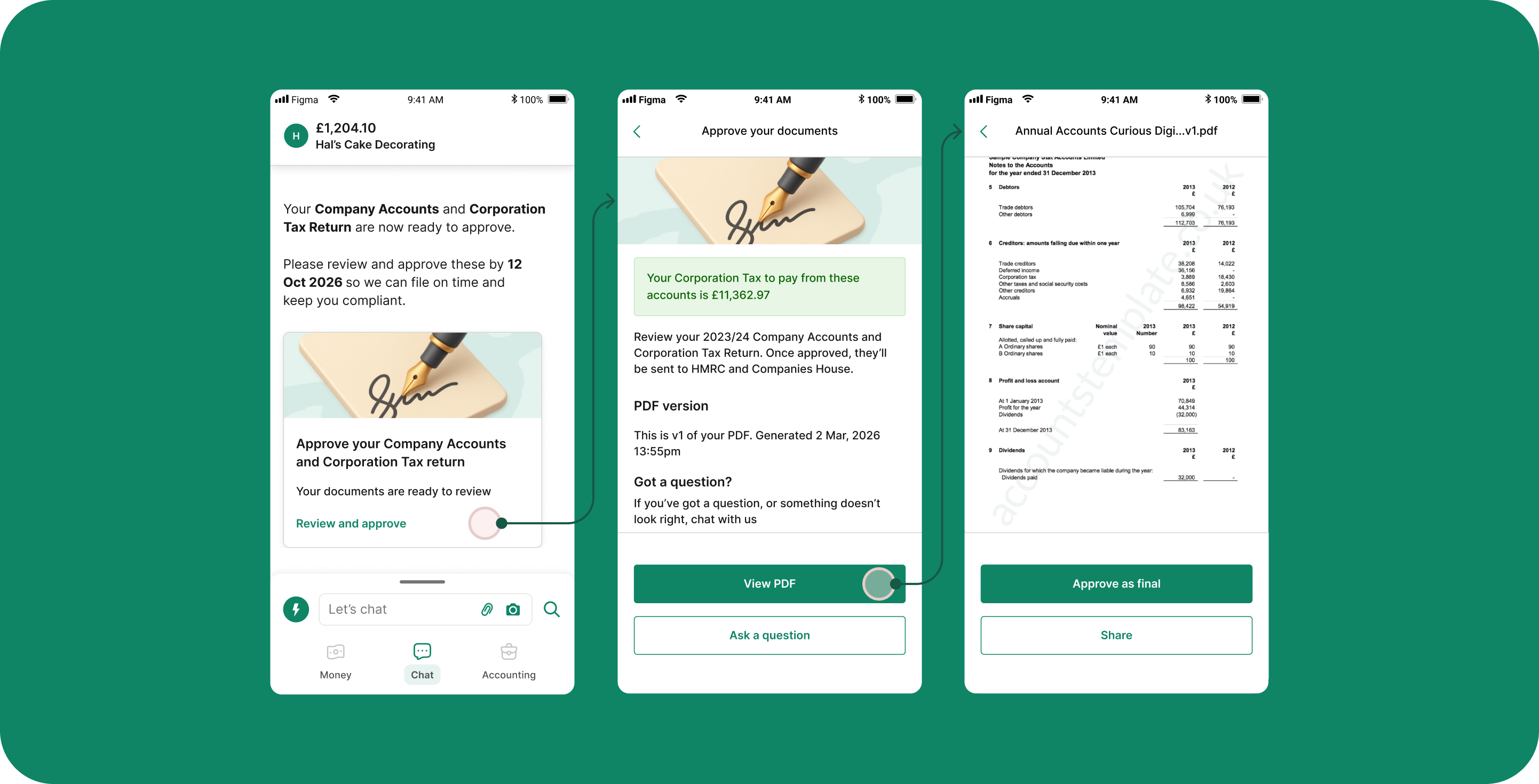
Company Accounts and a Corporation Tax Return can now be viewed and approved in the app – revolutionary for an accounting product and highly useful.

When users open their PDF to approve, from chat, a summary screen first shows key information. This was done to keep the PDF screen clear, as mobile real estate is minimal. Seeing the tax bill here stops users from approving incorrect documents, and they can ask the AI agent questions or make changes before approving.

Three screens: the chat card to review and approve, a summary showing the Corporation Tax to pay, and the full accounts PDF with an ‘Approve as final’ button
  1. 1
  2. 2
  3. 3
  4. 4
  5. 5
  6. 6

File PDF

The user gets feedback on documents being filed

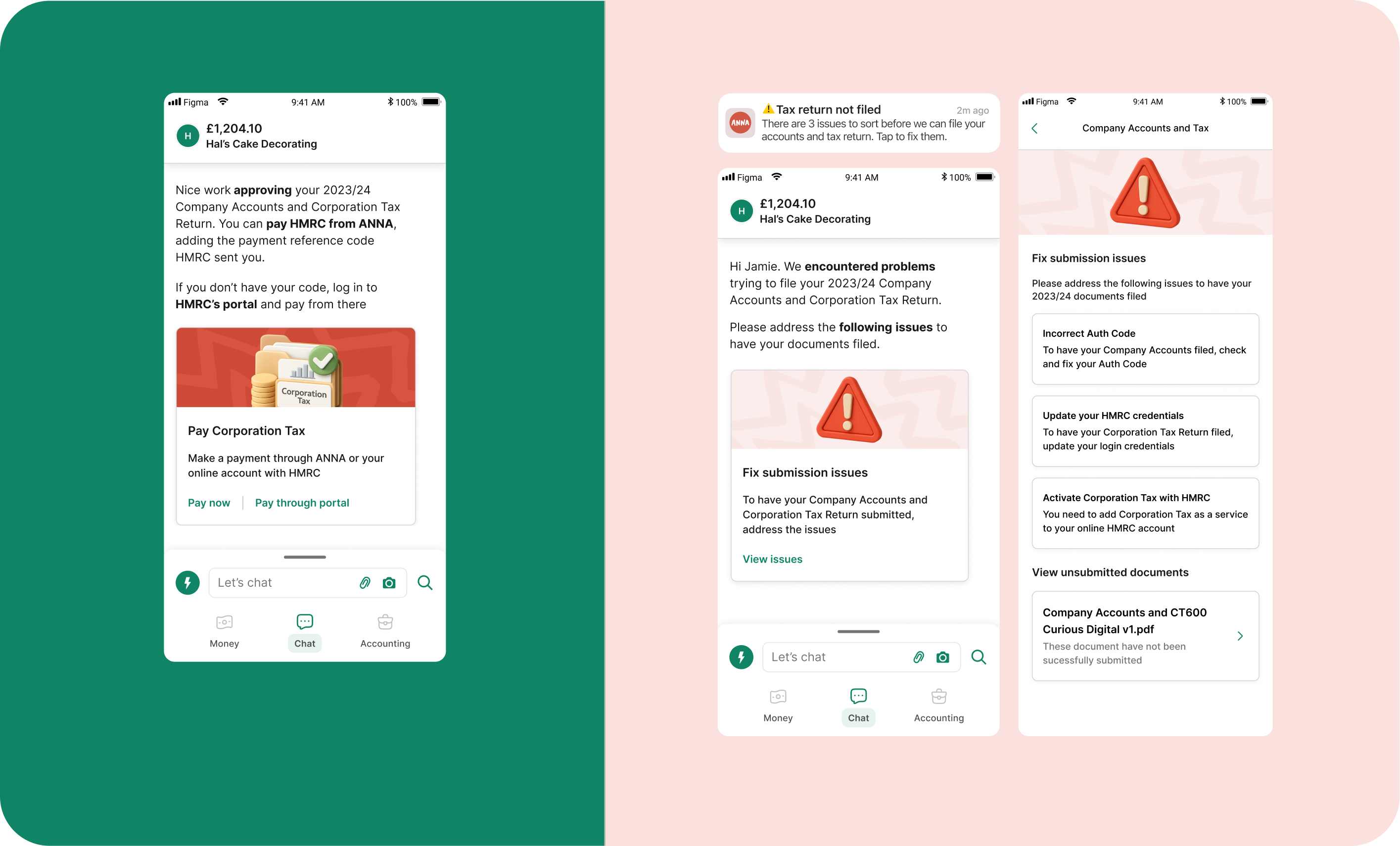
Once users approve their PDF, a chat message and an email with a link to pay HMRC are sent.

Problems can occur where the documents could not be filed. This is a high-stakes situation requiring strong and clear communication. I created a push, email, chat message and list view explaining the issues to fix. I broke each failure into its own task card with a single action, so users can fix one thing at a time. I reused the task-solving pattern, including a red warning graphic, for familiarity.

Success: a chat card to pay Corporation Tax. Failure: a ‘Tax return not filed’ notification, a chat card to fix submission issues, and a list of three issues to fix
  1. 1
  2. 2
  3. 3
  4. 4
  5. 5
  6. 6

Retrieve PDF

The user can retrieve their PDF any time

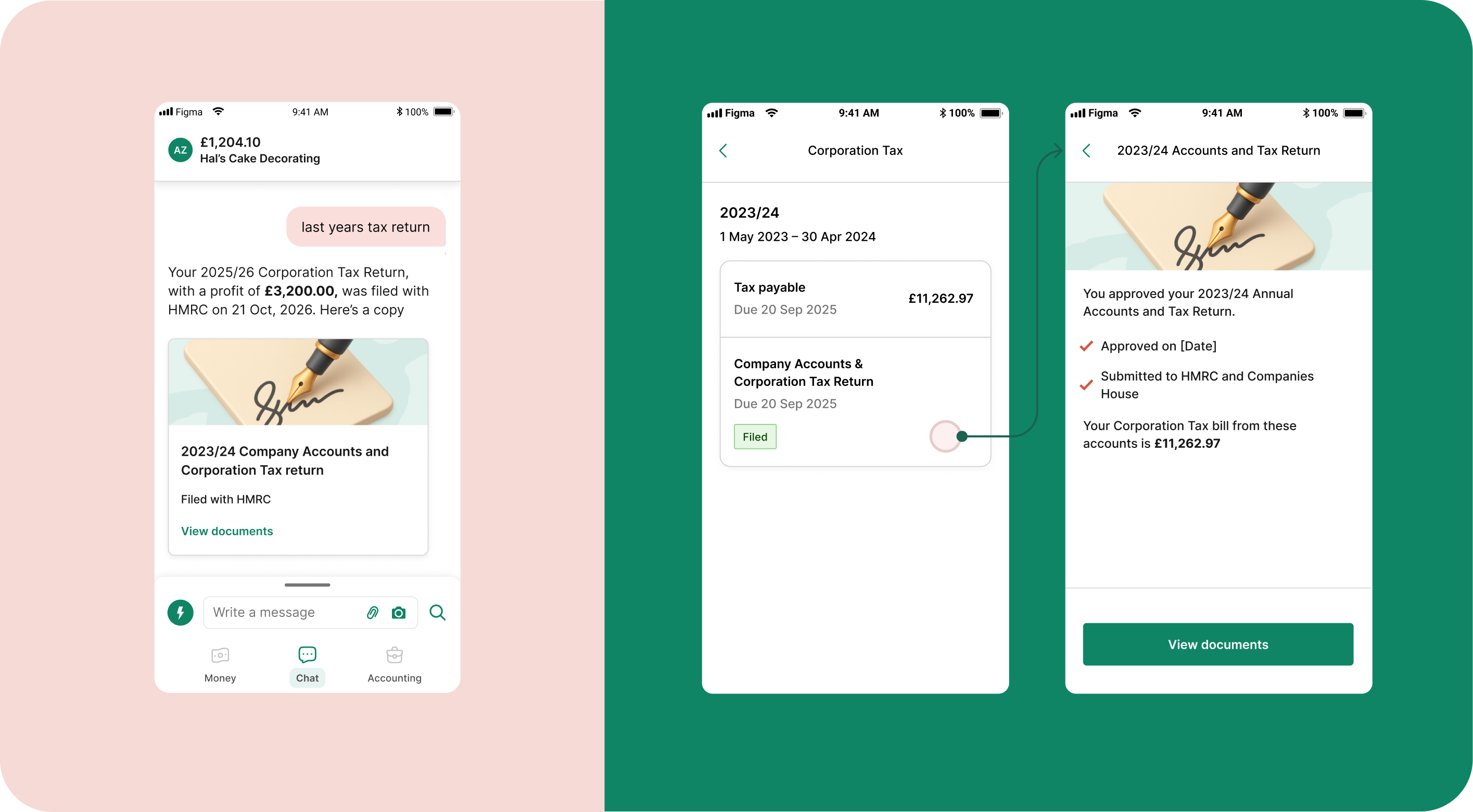
I considered providing access to filed PDFs as a strategic driver of repeat visits to the platform – believing ANNA users would open the app to dig up old documents. I defined how the agent should respond if the user asks in chat about their documents.

I also created a new Corporation Tax landing page in the app that gives access to the filed PDFs any time in future.

The agent sharing last year’s filed tax return in chat, and the Corporation Tax page listing filed documents with a link to view them

Outcomes

The impact

  • Corporation Tax page asking the user to approve their 2023/24 tax return

    84% more PDFs approved

    PDF approvals increased 84% in the 90 days after the AI agent and mobile PDF view were released.

  • The AI agent explaining an overdrawn Director Loan in chat

    80% task completion

    In August 2026, users had resolved 80% of July’s accounting tasks with the AI agent, unblocking their PDFs.

  • Illustration of a hand holding a phone showing an approval tick

    Full accounting automation

    ANNA can now offer business owners a self-service, end-to-end filing experience: a key part of the Auto Accountant product.

Ask questions and learn more

Book a call with me and I’ll walk you through the full story and answer any questions you have