


Back

MTD Quarterly Update Filing

Role
Lead Product Designer
Year
2026

I designed a new tax filing tool that achieved a 26.6% activation rate and created a new customer funnel for ANNA Money

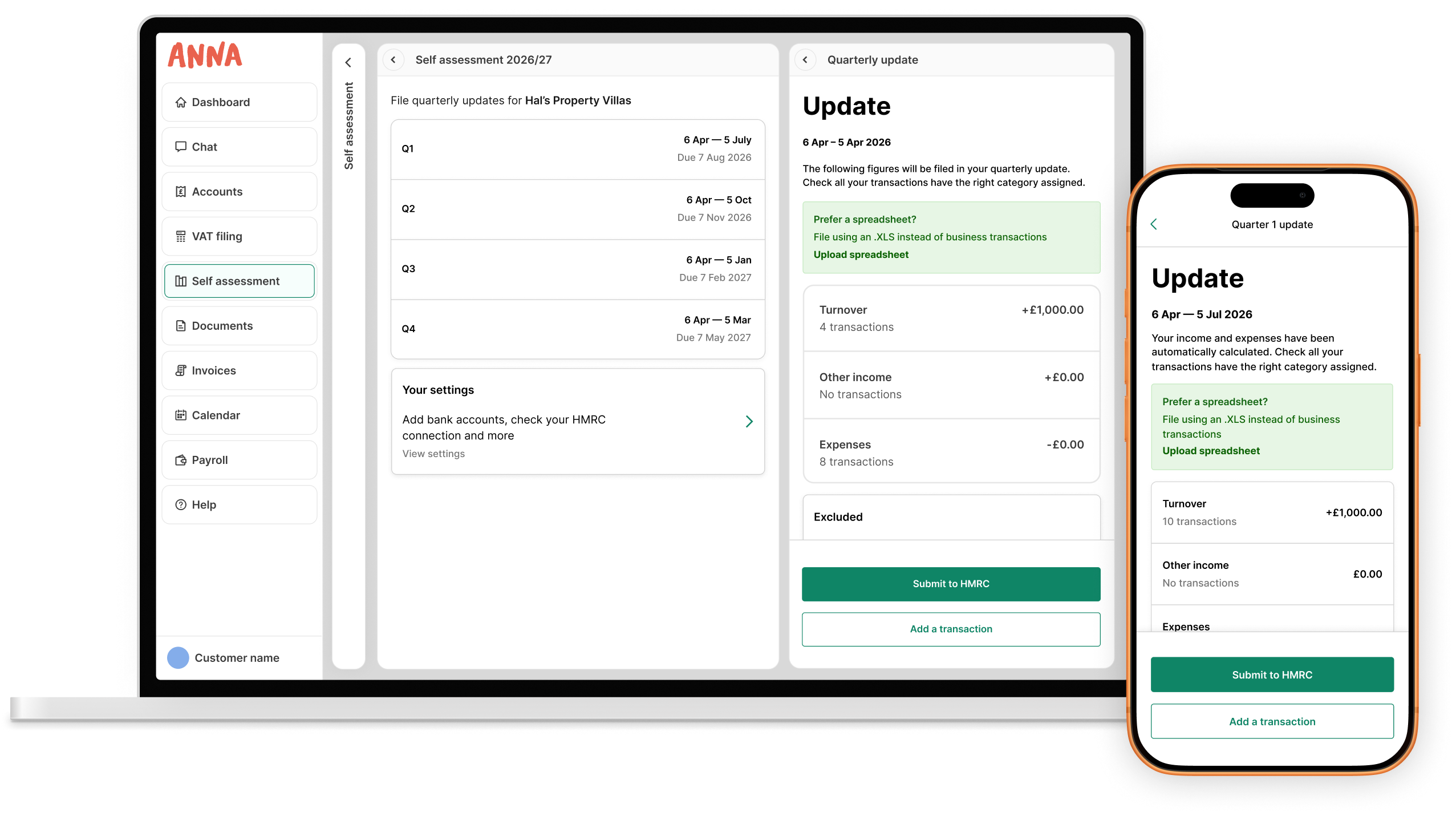
ANNA's quarterly update screens on a laptop and a phone

Project key facts

  • Team size: 5

    • Me, Lead Product Designer
    • 3 Engineers
    • Head of Product for Admin
  • Timeline

    2.5 months in 2026, alongside working on other projects

  • The client

    ANNA Money provides bank accounts and tax tools for small business owners in the UK

The problem

Business owners needed to start filing tax updates through a complex new HMRC system... but all they wanted was something easy

Under Making Tax Digital, sole traders had to switch from filing one tax return a year to four quarterly updates in a new way. The challenge was to make a change that nobody asked for feel effortless, and bring onboard new customers for ANNA Money.

What I did

The impact

I aligned the team on a user-centric vision for the tax filing tool and designed a collection of solutions end-to-end using a Figma design system. I pivoted the team away from a developer-centric proof of concept and wrote product requirements.

I prototyped with AI, ran UX research and embedded the insights. I worked through extensive HMRC requirements and financial data to create a successful tool.

  • Requirements writing
  • Ideation
  • AI prototyping
  • UI design
  • UX research
  • 26.6% activation

    Users complete onboarding, get set up and file with HMRC at 26.6%. Well above the “Great” FinTech benchmark of 22%

  • 60.6% onboarded

    Onboarding completion reached 60.6%, from account creation to ready-to-file

  • Funnel created

    ANNA now has a steady stream of new users engaging with the tool, ready to monetise

Process Step 1

I wrote requirements for the tool

Engineering’s proof of concept showed MTD filing was technically possible, but it wasn’t built around users: cluttered, dense, and with no obvious hierarchy guiding people on the task to complete.

Product strategy

I made the case for resetting direction. I distilled HMRC’s extensive MTD guidance into new requirements, anchored on one job-to-be-done: “Help me submit my quarterly update with minimal fuss and effort.” I walked engineering and the Head of Product for Business Admin through the new direction and got alignment.

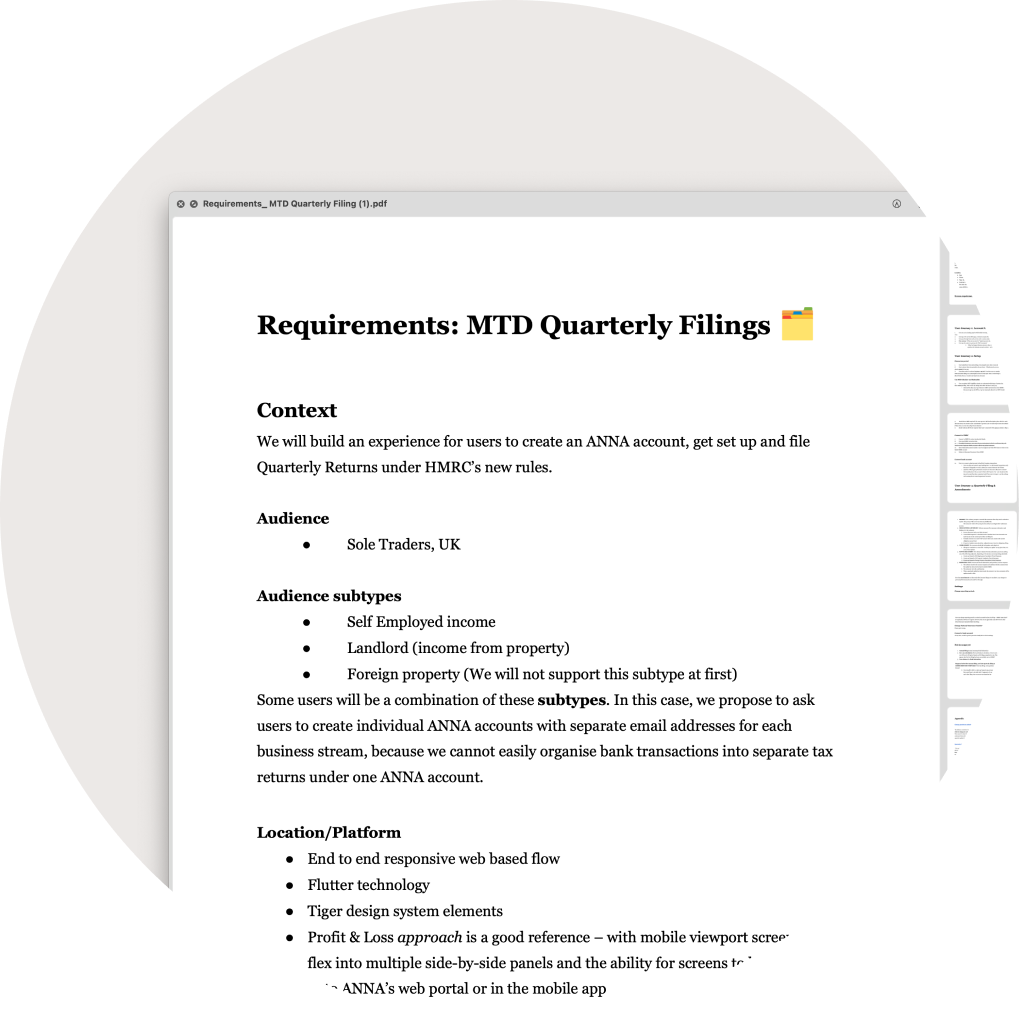
The MTD Quarterly Filings requirements document, covering context, audience and platform

Process Step 2

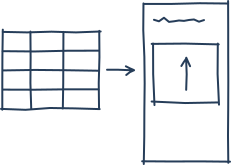
I explored four filing ideas

Users needed to have their business income and expenses recorded, tallied up and filed with HMRC. I explored four ways this could be done. I chose an auto-generated report from categorised bank transactions that just needs reviewing and filing. My hypothesis was this would result in good engagement and successful submissions, having required less work from the user.

What was the trade-off? I lost some simplicity and user control when stepping away from a form or spreadsheet, but the automated solution would save time for users and keep them compliant.

Process Step 3

I created a prototype using AI

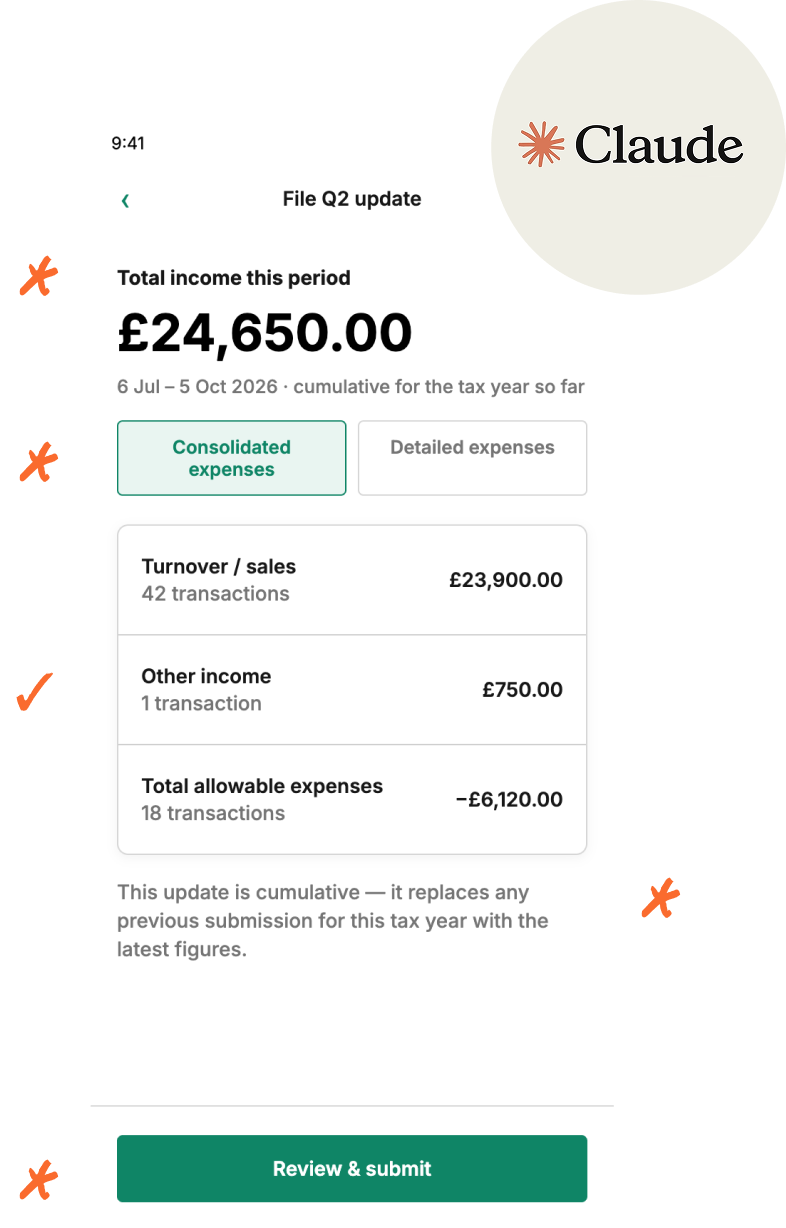
I gave Claude my requirements and Figma examples of ANNA’s type scale, colour tokens and core components, and had it prototype the full quarterly filing flow.

I kept some things it got right: a page structure that mirrored ANNA’s patterns. I cut poor UX aspects: HMRC terms like “obligation period” that our users wouldn’t recognise.

It wasn’t production-ready, because in Jan 2026 the prototyping process wasn’t creating slick developer-ready assets. But it gave engineering a clickable flow to react to and provide feedback, such as knowledge of missing edge cases and error states.

The AI-generated prototype of the quarterly update screen

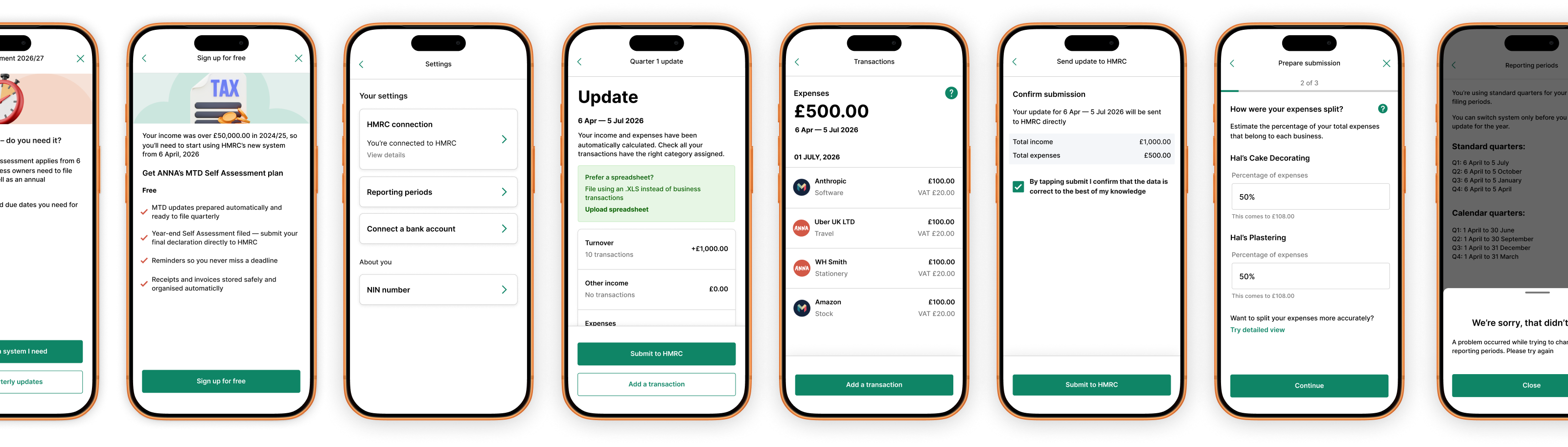
I created 130 screens using a design system

These covered the full journey across mobile and web: setting up the tool, reviewing and editing tax updates, filing with HMRC, and managing settings, plus edge cases and error states along the way.

A row of phone screens from the setup, filing and settings journeys

Project scope

Setup

8 items
  • Choose tax period
  • MTD checker
  • Connect to HMRC
  • Manual business type
  • Choose business
  • Enter NI number
  • Connect bank account
  • Bank account settings

Quarterly filing

7 items
  • Choose quarter
  • Check report
  • Change transactions
  • Add transaction manually
  • Submit to HMRC
  • Filing confirmation
  • Finish setting up

Settings

5 items
  • HMRC connection
  • Reporting periods
  • Reporting periods
  • Connected accounts
  • NI number

Key edge cases

7 items
  • HMRC connection issue
  • HMRC no businesses
  • Business type not supported
  • App needs updating
  • File midway-update
  • Overdue filing
  • Split transactions business

Mid-project pivot

I conducted research when a new direction surfaced

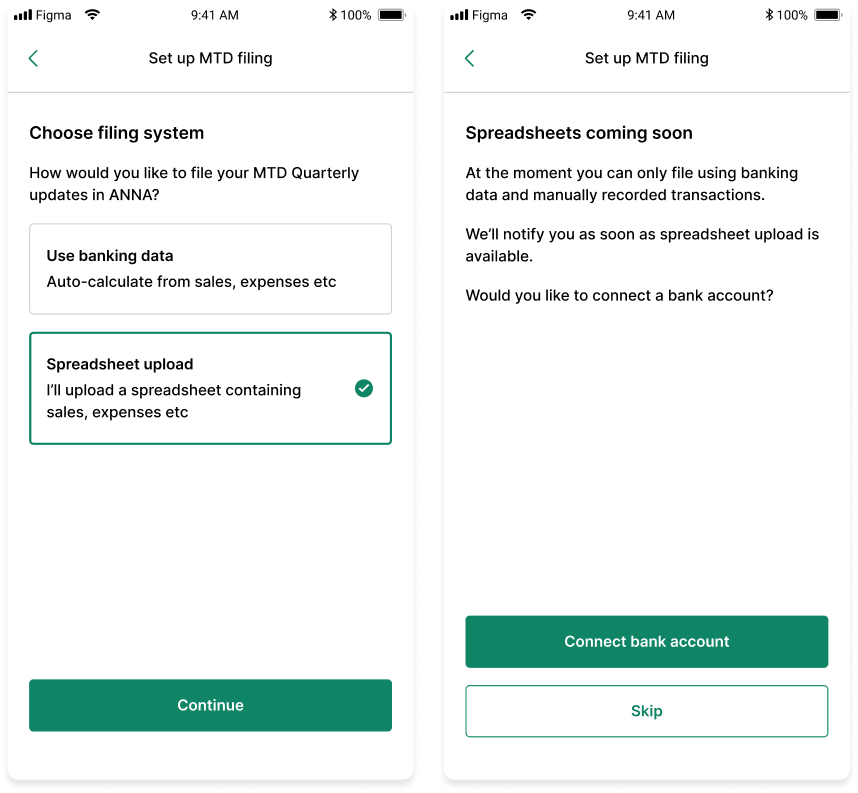
Development had started building from the designs when a new direction surfaced via the product owner. It was to deliver an additional option for filing, by spreadsheet upload.

To get a steer on user appetite for this, I created an in-app research screen capturing interest (top). Results showed 40% wanted a spreadsheet upload option, and the team saw this as valuable enough to continue with.

To find out why people wanted to file from spreadsheets, I conducted user interviews on the topic (bottom). I explored why they’d like a spreadsheet option, and how they imagined it working.

In-app research screens asking users how they would like to file, including a spreadsheet upload option
A remote user interview on a video call
User image changed for privacy

Research insights: Spreadsheets

Why spreadsheets?

I discovered why users would prefer this method over linking a bank account

  • They give control

    People believed they’d need to organise complex transactions themselves, not trusting an automated system to do this for them

  • They give privacy

    Business owners had a misconception that HMRC would get access to bank transaction data

  • “I’d rather not give MI5 a detailed view of my bank account if I can avoid it”

    — Interviewee, tongue-in-cheek

How spreadsheets should work

I discovered how users would like a spreadsheet option to work

  • Simplicity drives use

    People saw quarterly filing as annoying admin, so they wanted to upload and submit rapidly, not jump through hoops

  • One spreadsheet to rule them all

    Users wanted to file all business tax returns from one spreadsheet, not maintaining multiple versions

  • “Can’t it just be one form entry to HMRC?”

    — Interviewee

Solutions

Setup made easy

Setup involved a number of complex steps, but 60.6% of users got through the process 🎉

For example, one step entails connecting to HMRC. It only works if users have already signed up to the MTD initiative with HMRC, and they can remember and sign in with their HMRC credentials. Here, I made the complex step skippable, flagged to return to later.

Some more design decisions I made:

  • I created an ‘MTD Checker tool’ to ensure users land in the relevant tool for them
  • I included a step by step motif with a progress bar to guide users forward
  • I created a step for the user to describe the content of a personal bank account, making automatic bank categorisation and the tax update more accurate
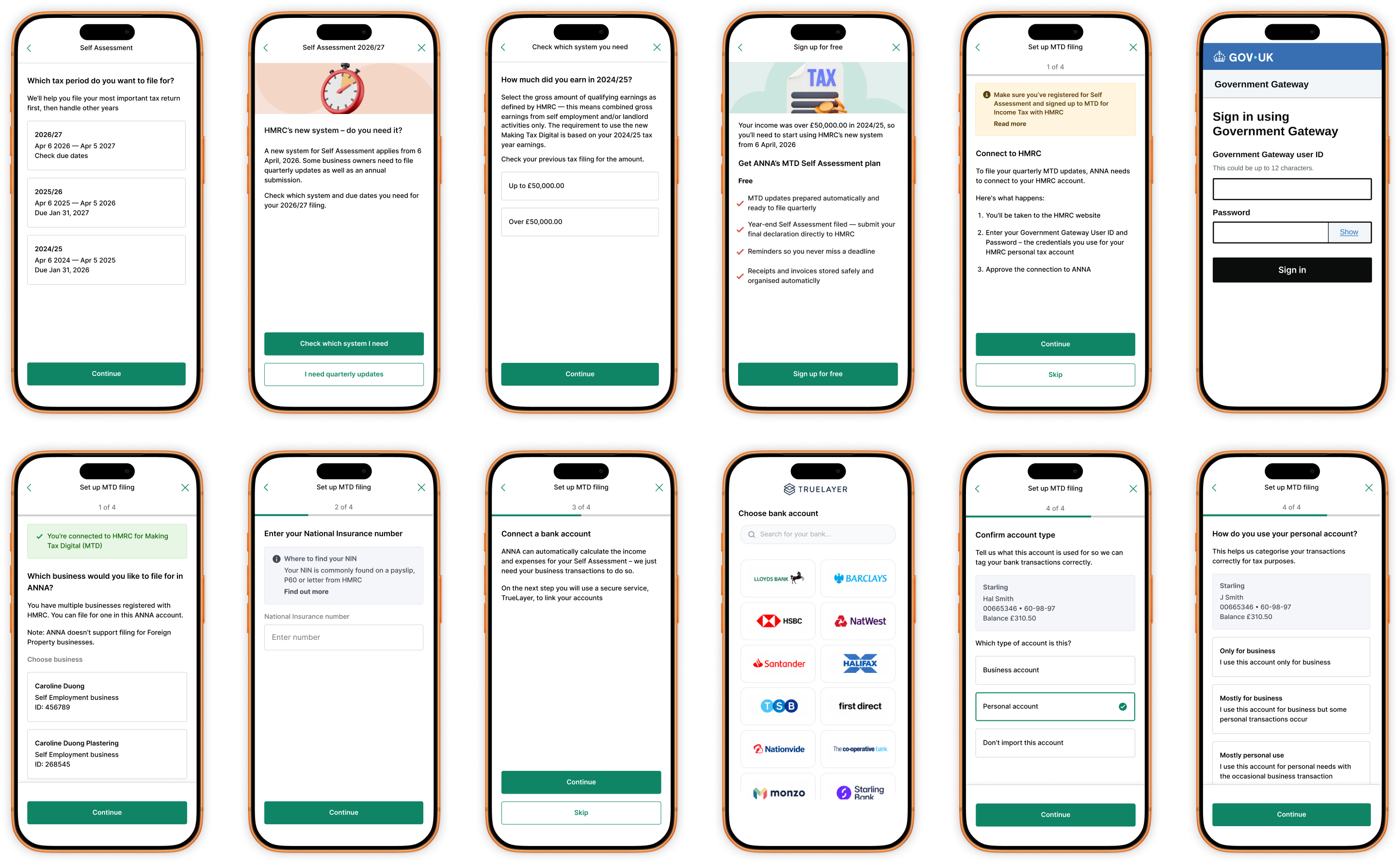
Onboarding screens including the MTD checker, progress bar and skippable HMRC connection step

View auto-report and file

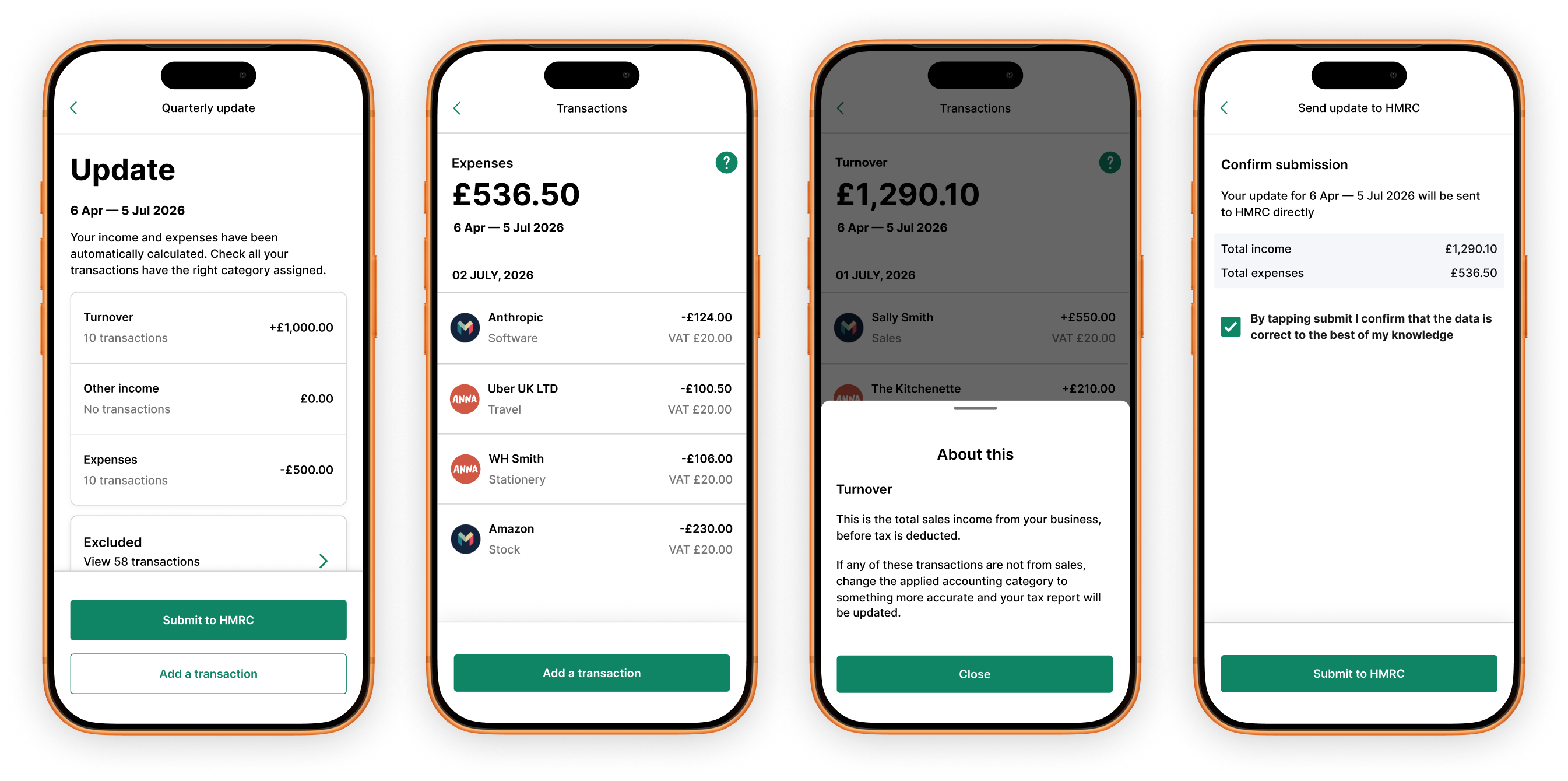
Instead of asking users to enter numbers, ANNA calculates their quarterly totals from transactions it has already categorised. Users review income and expenses, tap in to fix any miscategorised transactions, then send the update straight to HMRC. They can add a manually written transaction for things like a cash sale. Complex words are explained in useful help content. Overall, filing becomes a quick check, not a data-entry task.

Four phone screens: the quarterly update, a transaction list, help content and the HMRC confirmation

File by spreadsheet upload

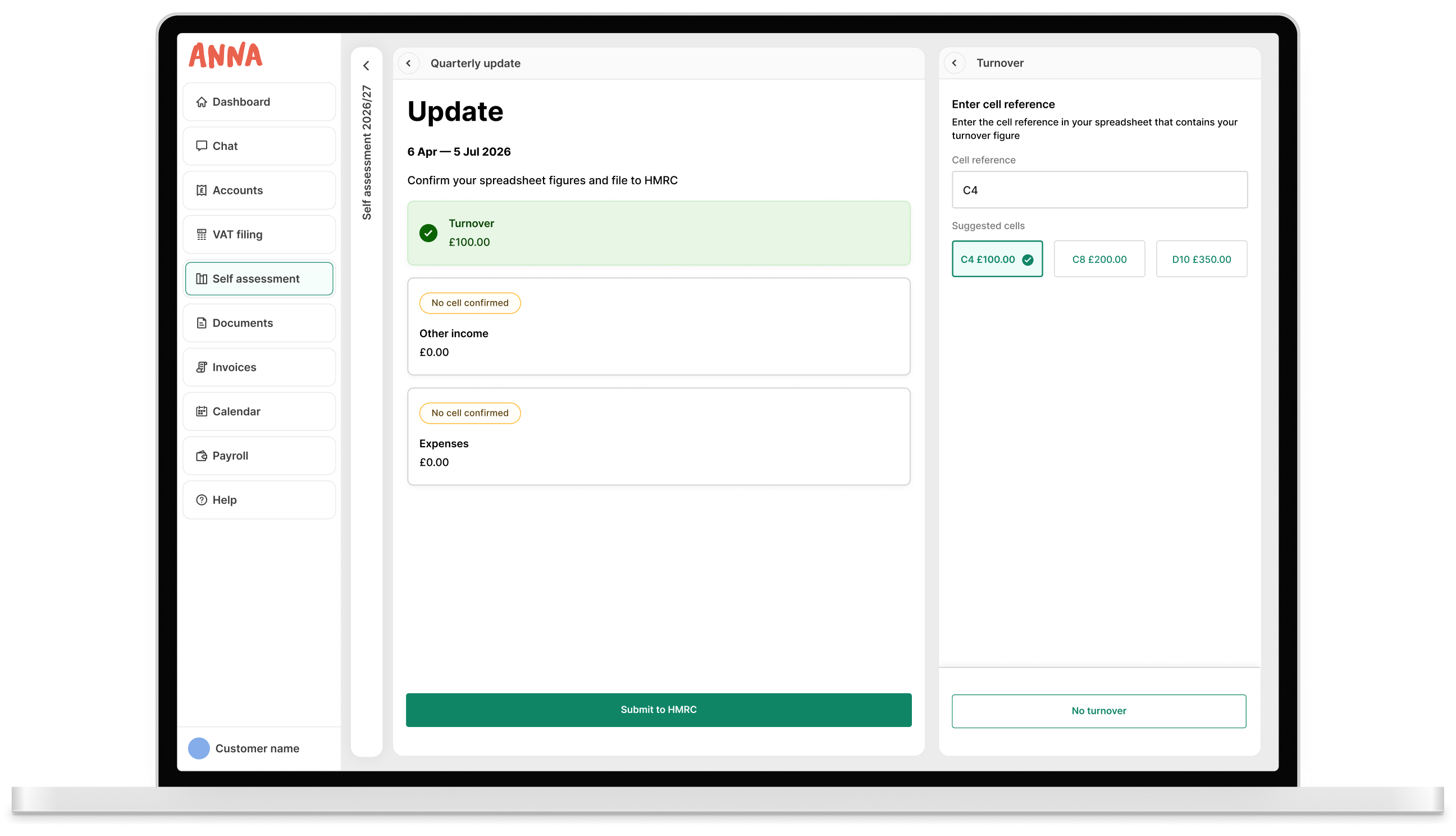
For the users that didn’t want to file their MTD updates via categorised bank transactions they can use the spreadsheet upload version.

How does this work?

  • Users upload a spreadsheet, and navigate file type issues
  • The spreadsheet is parsed and suggested cells are identified
  • User agrees to the suggested cells or enters a different cell reference
  • All three report figures are complete, user submits to HMRC

I led the engineering team to include suggested cells to make the process smart and easy. They needed to build extra intelligence, but appreciated the UX direction and were completely onboard with it.

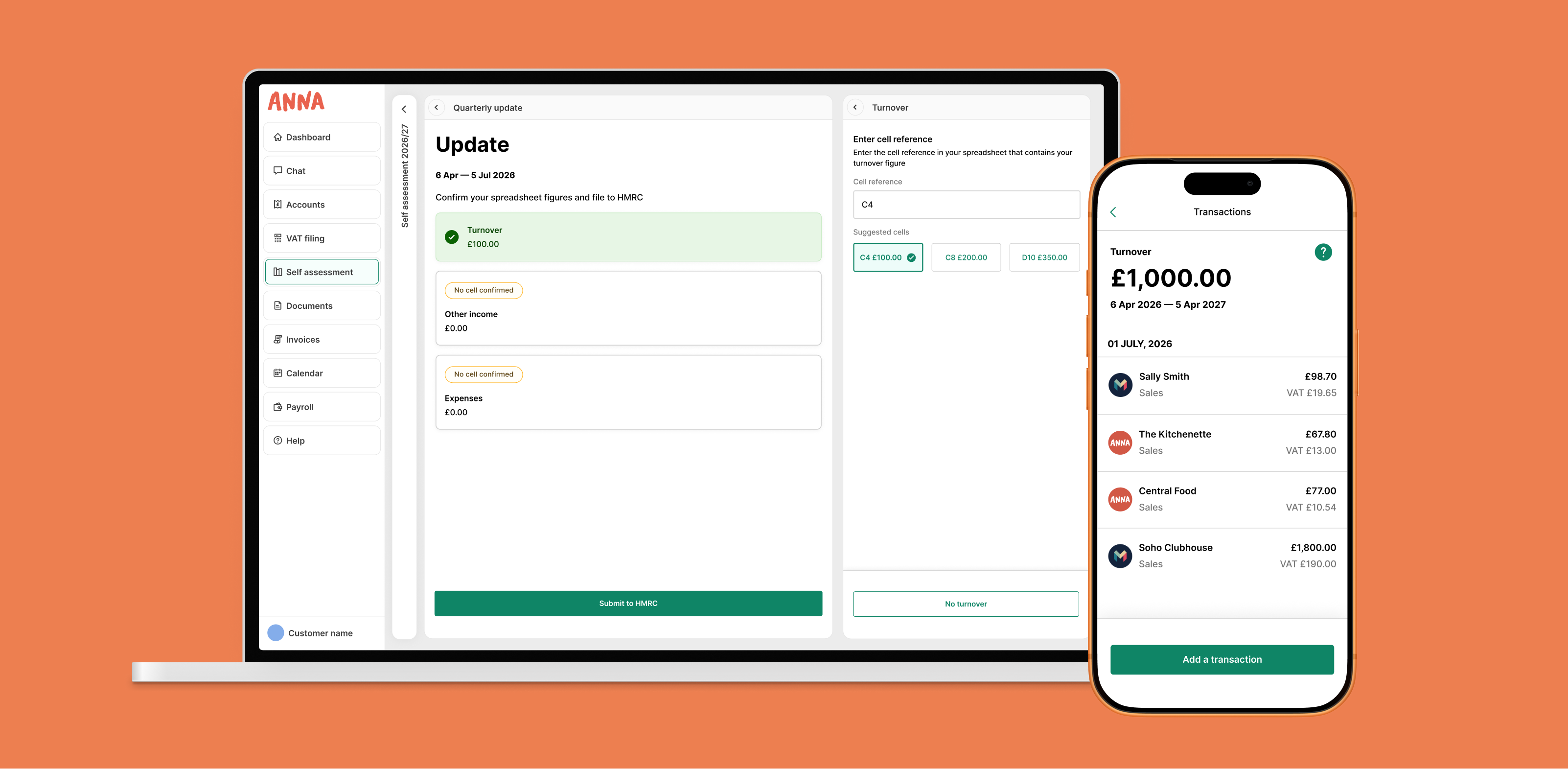
The web app's quarterly update with suggested spreadsheet cells for the turnover figure
A row of web screens covering spreadsheet upload, cell errors and a completed report

Deployed to app and web simultaneously

The project started as mobile-only, but I pushed for a simultaneous launch on both platforms, effectively doubling the audience. With ANNA having multiple design systems, I selected the component library elements that could be deployed across platforms. I also designed each UI pane to stand on its own, checking that content made sense on mobile when other panes were hidden.

The quarterly update on the web app alongside the same flow on mobile

Outcomes

The impact

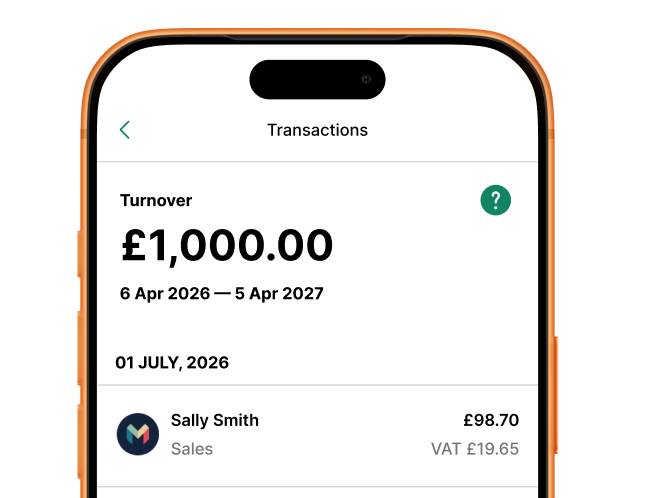
  • Turnover total in the mobile app

    26.6% activation rate

    Users complete onboarding, setup, use the tool and successfully file with HMRC at 26.6% – via 25 screens. The Product Growth blog benchmarks a 22% activation rate as “Great” for FinTech products, so this is well ahead of that bar.

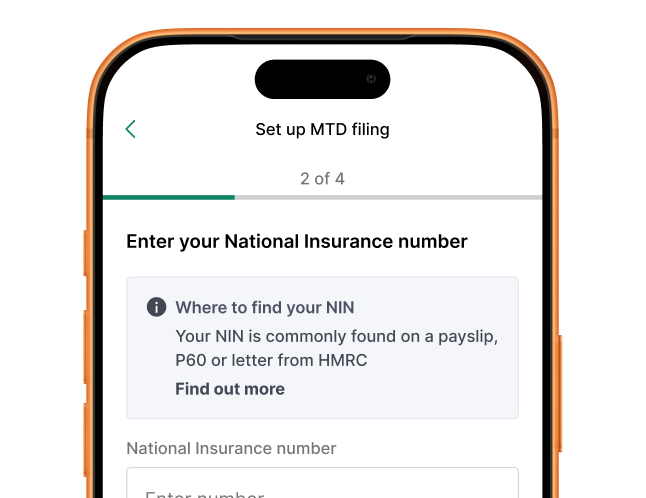
  • Onboarding step asking for a National Insurance number

    60.6% ready to file

    Users reached a strong conversion rate through onboarding and setup. Good design helped navigate the complexity found in the required steps.

  • The ANNA app loading on a phone

    New funnel created

    ANNA now has a steady stream of new users onboarding and engaging with the tool, providing the opportunity to monetise the audience by cross-selling products.

Ask questions and learn more

Book a call with me and I’ll walk you through the full story and answer any questions you have